> ## Documentation Index
> Fetch the complete documentation index at: https://rain-sandbox-trial.mintlify.site/llms.txt
> Use this file to discover all available pages before exploring further.
# 3D Secure (3DS)
> Rain supports three ways to validate cardholders' transactions using 3D Secure (3DS) authentication — Hosted (the default), Out-of-Band (push notifications and biometric authentication), and 3DS Forwarding. This guide explains each option, how to choose between them, and how to implement Forwarding and push notifications.
Rain supports three ways to run 3D Secure (3DS) authentication on your cards, and this guide helps you decide which is the right fit for your product and engineering resources.
## What is 3DS?
3D Secure (3DS) is an additional authentication layer used during online card transactions to verify that the person making a purchase is the legitimate cardholder. **3DS is merchant-initiated and can't be triggered by other parties.** The cardholder is then prompted to complete a challenge — typically entering a one-time passcode (OTP) sent by SMS, email, or another channel — before the transaction can proceed.
3DS challenges are not triggered on every transaction. Whether a challenge occurs depends on merchant rules, transaction risk signals, merchant configuration, and network requirements.
 3DS Forwarding and Push Notifications don't replace 3DS — they change **who delivers the challenge to your user, and how.**
## Anatomy of a 3DS challenge
A 3DS flow is made up of a few independent parts. Understanding them is the key to understanding your options below.
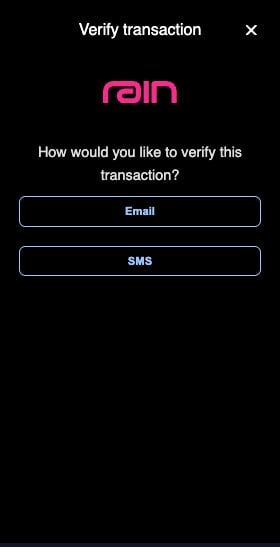
* **Choice screen** — The screen the cardholder sees at checkout, where they choose which challenge method to continue with (for example, SMS or Email).
3DS Forwarding and Push Notifications don't replace 3DS — they change **who delivers the challenge to your user, and how.**
## Anatomy of a 3DS challenge
A 3DS flow is made up of a few independent parts. Understanding them is the key to understanding your options below.
* **Choice screen** — The screen the cardholder sees at checkout, where they choose which challenge method to continue with (for example, SMS or Email).
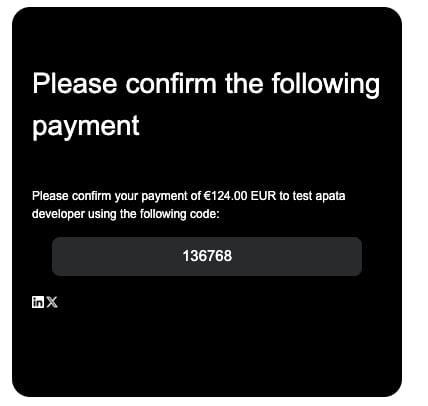
 * **Authentication delivery** — The OTP or approve/deny prompt sent to your user (for example, "Your card verification code is: XXXXXX").
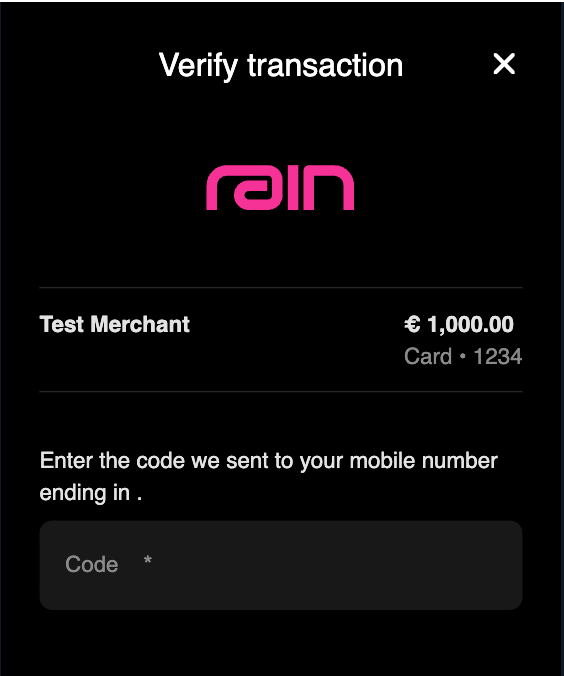
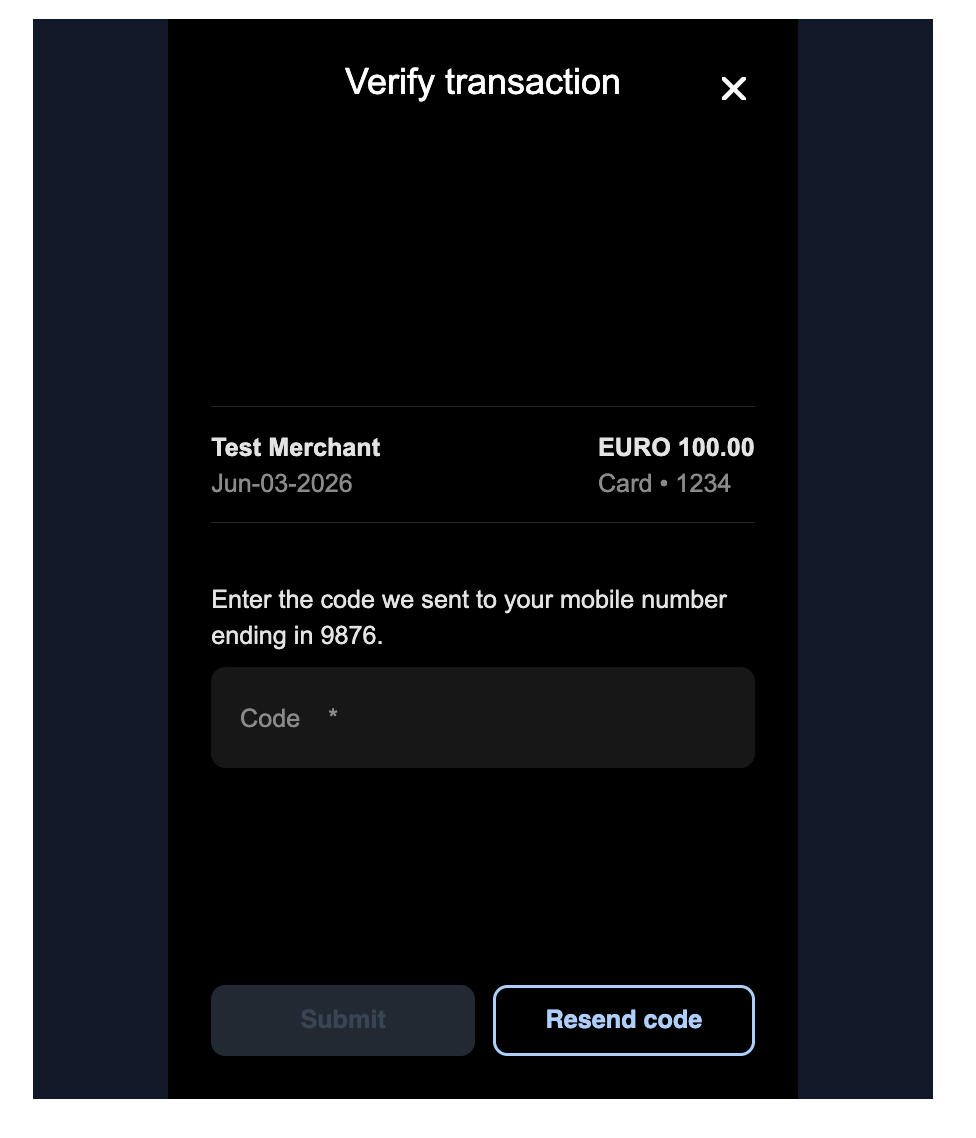
 * **Challenge screen** — The screen the cardholder sees once they have chosen their preferred challenge method (for example, if they selected SMS: "Enter the SMS OTP we sent to your mobile number ending in 1234").
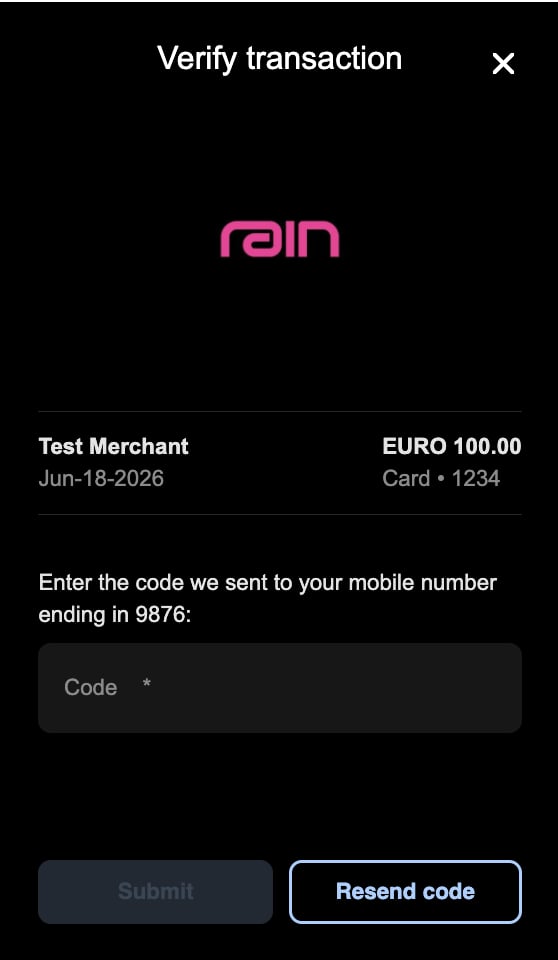 Your 3DS flow will NOT have the Rain logo. The logos above are for demonstration purposes only. **Branding is for enterprise tier partners.** Only Enterprise tier partners can add their logo and choose the colors/text on these screens. For non-Enterprise tier partners, your 3DS screens will not include any logos (again, the images above show the Rain logo as a placeholder). If you want logos, talk to your Account Manager about upgrading your tier.
## Your three options
### 1. Hosted 3DS (default)
Rain's Access Control Server (ACS) handles the entire challenge and delivers the OTP by SMS or email on your behalf. This is the **default for every partner** and requires no engineering work on your end. You cannot edit the authentication delivery/challenge method UIs (for example, the email template). Enterprise partners can customize the choice screen and challenge screen with their logo and colors.
The challenge methods here are **SMS and Email**.
### 2. Out-of-Band (OOB)
Out-of-Band (OOB) authentication verifies the cardholder through a separate channel — your app — instead of collecting an OTP within the checkout flow. Out-of-Band authentication has two methods — **push notifications** and **biometric authentication**. In both, there is no OTP: your app captures the cardholder's approve/deny decision, and you report it back to Rain by calling Rain's [`/3ds`](#reporting-the-decision-to-rain) endpoint.
For push notifications, Rain sends your backend a webhook when a challenge is needed. Your app shows the cardholder a simple **approve/deny prompt**, and you report their decision through [`/3ds`](#reporting-the-decision-to-rain) as described above. There is no OTP to deliver — just a decision to relay. This is the most secure option, but it requires you to already have (or build) a mobile app experience.
Biometric authentication currently has **limited Rain support**. It follows the same flow as push notifications though: you implement the biometric verification in your app and report the decision through the same [`/3ds`](#reporting-the-decision-to-rain) callback. See [Biometric authentication](#biometric-authentication-limited-rain-support).
OOB only works for cardholders who have your mobile app installed. It's an app-based flow, so a cardholder without your app has no way to receive the push notification or complete the biometric check. If **any** of your cardholders don't have your app, you can't use OOB.
### 3. 3DS Forwarding
Instead of Rain's ACS delivering the OTP directly, the challenge information (including transaction details) is forwarded to you via webhook, and you take over delivery through your own SMS, [in-app](#in-app-notifications-vs-push-notifications) (displaying the OTP in app), email, WhatsApp, Telegram, or other channel. This gives you **full control of last-mile delivery**. You can choose the UI of the choice screen and the challenge screen **and** the individual authentication delivery methods/challenge methods (for example, the email template).
If you have cardholders in jurisdictions where OTPs are prohibited (for example, the UAE), we suggest choosing Push Notifications.
## Availability by program tier
The options Rain offers depend on your program tier. Hosted 3DS is the default for every tier and requires no setup. Push Notifications and 3DS Forwarding are opt-in options that Rain enables per program when you contact your Rain account manager.
| Program tier | Hosted 3DS (default) | Push Notifications (OOB) | 3DS Forwarding |
| ------------ | -------------------- | -------------------------------- | -------------- |
| Developer | Available | Not offered | Not offered |
| Startup | Available | Available — Rain recommends this | Not offered |
| Enterprise | Available | Available — Rain recommends this | Available |
For Startup tier programs, when Rain enables Push Notifications, push becomes the challenge method for that program's cards, so the multiple-method choice screen no longer applies. Enterprise tier programs can add other challenge methods alongside push, although we recommend only using push.
To set up the options offered for your tier, work with your Rain account manager — see [Enabling 3DS Forwarding or Push Notifications](#enabling-3ds-forwarding-or-push-notifications).
## Comparison matrix
Use this table to compare the three paths side by side.
| Feature | Hosted 3DS | Out-of-Band (OOB) | 3DS Forwarding |
| -------------------------------------- | ------------------------------------------------------------------------------------------ | --------------------------------------------------------------------------------------------------------------------------------------------------------------------------------------------- | ---------------------------------------------------------------------------------------------------------------------------------------------------------------------------------------- |
| **Delivery channels** | SMS or email only | Push notification or biometric prompt (in your app) | Any channel you choose: SMS, email, WhatsApp, Telegram, [in-app OTP](#in-app-notifications-vs-push-notifications) |
| **Who delivers the code / prompt** | Rain's 3DS provider | You, through your own app | You, through your own provider (e.g. Twilio) or service |
| **Customization of delivered message** | Not customizable | Fully customizable — the push or biometric verification UI is entirely yours | Fully customizable — the copy, branding, localization, and UI are entirely yours |
| **Known deliverability gaps** | SMS can be blocked in some countries (e.g. UAE) | Solves the SMS deliverability gap | Entirely dependent on your provider and setup |
| **Security profile** | Standard | Highest — widely considered the most fraud-resistant option because it's fully delivered over the internet | Depends on the channel and provider you choose (e.g. SMS is less secure than OOB because it's over a network vulnerable to SIM-swapping, smishing (SMS + phishing) and SS7 interception) |
| **Challenge screen branding** | Configurable for enterprise tier (logo, colors, minor text) | Configurable for enterprise tier (logo, colors, minor text) | Configurable for enterprise tier (logo, colors, minor text) |
| **What you own** | Nothing beyond optional branding for enterprise tier | Your push UX (or biometric UX); reporting the decision back to Rain ([`/3ds`](#reporting-the-decision-to-rain)); and migrating cards onto the new flow (`/challenge-profile`, available soon) | Your messaging infrastructure, deliverability, monitoring and UI |
| **Implementation effort** | Low — this is the default. Automatically enrolled. Requires no engineering effort from you | A webhook integration plus an app update, and rolling out to users | A webhook integration plus your own provider setup |
| **Typical timeline** | A couple of days | A few weeks, typically a bit longer than Forwarding since it's tied to app release cycles | A few weeks, depending on your engineering resources |
| **Best fit** | Getting live quickly with minimal engineering lift | Mobile-app partners who want the strongest fraud protection and best deliverability | Partners who might not have an app. Partners who want control over delivery methods/providers. |
All three paths can be tested on a small number of production cards before rolling out broadly — you don't need to commit your entire card base on day one. See [Testing and rollout](#testing-and-rollout).
## Choosing the right option
Your program tier determines which of these options are available to you — see [Availability by program tier](#availability-by-program-tier).
* **Want our suggestion?** — Push Notifications (OOB). More control for you and most secure.
* **Have users who don't have your app?** — Hosted or 3DS Forwarding. Push Notifications is only for users with the app.
* **Want to go live as fast as possible with minimal engineering lift?** — Hosted 3DS is likely the right starting point.
* **Have a mobile app and want the most fraud-resistant option?** — Push Notifications (OOB) gives you the strongest protection.
* **Want full control of deliverability, and have (or are willing to set up) messaging infrastructure?** — 3DS Forwarding or Push Notifications (OOB) is built for this.
* **Want full control of branding and channel mix?** — 3DS Forwarding or Push Notifications (OOB).
These paths aren't mutually exclusive over time — many partners start on Hosted 3DS, then move to Forwarding or Push as their program matures.
## Supported challenge methods
You can mix and match your challenge methods. The methods available depend on the option you choose:
| Hosted 3DS | Out-of-Band (OOB) | 3DS Forwarding |
| ---------- | ----------------------------------------------- | -------------------------------------------------------------------------------------------------------- |
| SMS | Push Notification | SMS |
| Email | Biometric authentication (limited Rain support) | Email |
| | | [In-app notifications](#in-app-notifications-vs-push-notifications) (i.e. push notification with an OTP) |
| | | Telegram (limited Rain support) |
| | | WhatsApp (limited Rain support) |
Generally, we suggest using no more than **2 challenge methods**. On the Push Notifications path, Startup tier partners use Push Notifications as their only challenge method, while Enterprise tier partners can add other challenge methods alongside it.
## In-app notifications vs. push notifications
Both are messages your app sends the cardholder. The difference is whether the message carries an OTP, and that difference changes how you implement each one.
| | In-app notification | Push notification (OOB) |
| ---------------------------- | ----------------------------------------------------------------------------------------------------------------------------- | ----------------------------------------------------------------------------------------------------------------------------------------- |
| **What the cardholder sees** | Notification with a 6-digit OTP to read and enter | Push notification with an approve/deny (yes/no) prompt |
| **Is there an OTP?** | Yes | No |
| **Which 3DS path** | 3DS Forwarding | Out-of-Band (OOB) |
| **Webhook `deliveryMethod`** | `OTHER` | `PUSH` |
| **How you implement it** | Same as SMS Forwarding — deliver the OTP from the `challenge.requested` webhook and respond `200`. There is no decision call. | Show the prompt, then report the cardholder's decision by calling [`POST /v1/issuing/transactions/3ds`](#reporting-the-decision-to-rain). |
| **Requires your mobile app** | Yes | Yes |
Your 3DS flow will NOT have the Rain logo. The logos above are for demonstration purposes only. **Branding is for enterprise tier partners.** Only Enterprise tier partners can add their logo and choose the colors/text on these screens. For non-Enterprise tier partners, your 3DS screens will not include any logos (again, the images above show the Rain logo as a placeholder). If you want logos, talk to your Account Manager about upgrading your tier.
## Your three options
### 1. Hosted 3DS (default)
Rain's Access Control Server (ACS) handles the entire challenge and delivers the OTP by SMS or email on your behalf. This is the **default for every partner** and requires no engineering work on your end. You cannot edit the authentication delivery/challenge method UIs (for example, the email template). Enterprise partners can customize the choice screen and challenge screen with their logo and colors.
The challenge methods here are **SMS and Email**.
### 2. Out-of-Band (OOB)
Out-of-Band (OOB) authentication verifies the cardholder through a separate channel — your app — instead of collecting an OTP within the checkout flow. Out-of-Band authentication has two methods — **push notifications** and **biometric authentication**. In both, there is no OTP: your app captures the cardholder's approve/deny decision, and you report it back to Rain by calling Rain's [`/3ds`](#reporting-the-decision-to-rain) endpoint.
For push notifications, Rain sends your backend a webhook when a challenge is needed. Your app shows the cardholder a simple **approve/deny prompt**, and you report their decision through [`/3ds`](#reporting-the-decision-to-rain) as described above. There is no OTP to deliver — just a decision to relay. This is the most secure option, but it requires you to already have (or build) a mobile app experience.
Biometric authentication currently has **limited Rain support**. It follows the same flow as push notifications though: you implement the biometric verification in your app and report the decision through the same [`/3ds`](#reporting-the-decision-to-rain) callback. See [Biometric authentication](#biometric-authentication-limited-rain-support).
OOB only works for cardholders who have your mobile app installed. It's an app-based flow, so a cardholder without your app has no way to receive the push notification or complete the biometric check. If **any** of your cardholders don't have your app, you can't use OOB.
### 3. 3DS Forwarding
Instead of Rain's ACS delivering the OTP directly, the challenge information (including transaction details) is forwarded to you via webhook, and you take over delivery through your own SMS, [in-app](#in-app-notifications-vs-push-notifications) (displaying the OTP in app), email, WhatsApp, Telegram, or other channel. This gives you **full control of last-mile delivery**. You can choose the UI of the choice screen and the challenge screen **and** the individual authentication delivery methods/challenge methods (for example, the email template).
If you have cardholders in jurisdictions where OTPs are prohibited (for example, the UAE), we suggest choosing Push Notifications.
## Availability by program tier
The options Rain offers depend on your program tier. Hosted 3DS is the default for every tier and requires no setup. Push Notifications and 3DS Forwarding are opt-in options that Rain enables per program when you contact your Rain account manager.
| Program tier | Hosted 3DS (default) | Push Notifications (OOB) | 3DS Forwarding |
| ------------ | -------------------- | -------------------------------- | -------------- |
| Developer | Available | Not offered | Not offered |
| Startup | Available | Available — Rain recommends this | Not offered |
| Enterprise | Available | Available — Rain recommends this | Available |
For Startup tier programs, when Rain enables Push Notifications, push becomes the challenge method for that program's cards, so the multiple-method choice screen no longer applies. Enterprise tier programs can add other challenge methods alongside push, although we recommend only using push.
To set up the options offered for your tier, work with your Rain account manager — see [Enabling 3DS Forwarding or Push Notifications](#enabling-3ds-forwarding-or-push-notifications).
## Comparison matrix
Use this table to compare the three paths side by side.
| Feature | Hosted 3DS | Out-of-Band (OOB) | 3DS Forwarding |
| -------------------------------------- | ------------------------------------------------------------------------------------------ | --------------------------------------------------------------------------------------------------------------------------------------------------------------------------------------------- | ---------------------------------------------------------------------------------------------------------------------------------------------------------------------------------------- |
| **Delivery channels** | SMS or email only | Push notification or biometric prompt (in your app) | Any channel you choose: SMS, email, WhatsApp, Telegram, [in-app OTP](#in-app-notifications-vs-push-notifications) |
| **Who delivers the code / prompt** | Rain's 3DS provider | You, through your own app | You, through your own provider (e.g. Twilio) or service |
| **Customization of delivered message** | Not customizable | Fully customizable — the push or biometric verification UI is entirely yours | Fully customizable — the copy, branding, localization, and UI are entirely yours |
| **Known deliverability gaps** | SMS can be blocked in some countries (e.g. UAE) | Solves the SMS deliverability gap | Entirely dependent on your provider and setup |
| **Security profile** | Standard | Highest — widely considered the most fraud-resistant option because it's fully delivered over the internet | Depends on the channel and provider you choose (e.g. SMS is less secure than OOB because it's over a network vulnerable to SIM-swapping, smishing (SMS + phishing) and SS7 interception) |
| **Challenge screen branding** | Configurable for enterprise tier (logo, colors, minor text) | Configurable for enterprise tier (logo, colors, minor text) | Configurable for enterprise tier (logo, colors, minor text) |
| **What you own** | Nothing beyond optional branding for enterprise tier | Your push UX (or biometric UX); reporting the decision back to Rain ([`/3ds`](#reporting-the-decision-to-rain)); and migrating cards onto the new flow (`/challenge-profile`, available soon) | Your messaging infrastructure, deliverability, monitoring and UI |
| **Implementation effort** | Low — this is the default. Automatically enrolled. Requires no engineering effort from you | A webhook integration plus an app update, and rolling out to users | A webhook integration plus your own provider setup |
| **Typical timeline** | A couple of days | A few weeks, typically a bit longer than Forwarding since it's tied to app release cycles | A few weeks, depending on your engineering resources |
| **Best fit** | Getting live quickly with minimal engineering lift | Mobile-app partners who want the strongest fraud protection and best deliverability | Partners who might not have an app. Partners who want control over delivery methods/providers. |
All three paths can be tested on a small number of production cards before rolling out broadly — you don't need to commit your entire card base on day one. See [Testing and rollout](#testing-and-rollout).
## Choosing the right option
Your program tier determines which of these options are available to you — see [Availability by program tier](#availability-by-program-tier).
* **Want our suggestion?** — Push Notifications (OOB). More control for you and most secure.
* **Have users who don't have your app?** — Hosted or 3DS Forwarding. Push Notifications is only for users with the app.
* **Want to go live as fast as possible with minimal engineering lift?** — Hosted 3DS is likely the right starting point.
* **Have a mobile app and want the most fraud-resistant option?** — Push Notifications (OOB) gives you the strongest protection.
* **Want full control of deliverability, and have (or are willing to set up) messaging infrastructure?** — 3DS Forwarding or Push Notifications (OOB) is built for this.
* **Want full control of branding and channel mix?** — 3DS Forwarding or Push Notifications (OOB).
These paths aren't mutually exclusive over time — many partners start on Hosted 3DS, then move to Forwarding or Push as their program matures.
## Supported challenge methods
You can mix and match your challenge methods. The methods available depend on the option you choose:
| Hosted 3DS | Out-of-Band (OOB) | 3DS Forwarding |
| ---------- | ----------------------------------------------- | -------------------------------------------------------------------------------------------------------- |
| SMS | Push Notification | SMS |
| Email | Biometric authentication (limited Rain support) | Email |
| | | [In-app notifications](#in-app-notifications-vs-push-notifications) (i.e. push notification with an OTP) |
| | | Telegram (limited Rain support) |
| | | WhatsApp (limited Rain support) |
Generally, we suggest using no more than **2 challenge methods**. On the Push Notifications path, Startup tier partners use Push Notifications as their only challenge method, while Enterprise tier partners can add other challenge methods alongside it.
## In-app notifications vs. push notifications
Both are messages your app sends the cardholder. The difference is whether the message carries an OTP, and that difference changes how you implement each one.
| | In-app notification | Push notification (OOB) |
| ---------------------------- | ----------------------------------------------------------------------------------------------------------------------------- | ----------------------------------------------------------------------------------------------------------------------------------------- |
| **What the cardholder sees** | Notification with a 6-digit OTP to read and enter | Push notification with an approve/deny (yes/no) prompt |
| **Is there an OTP?** | Yes | No |
| **Which 3DS path** | 3DS Forwarding | Out-of-Band (OOB) |
| **Webhook `deliveryMethod`** | `OTHER` | `PUSH` |
| **How you implement it** | Same as SMS Forwarding — deliver the OTP from the `challenge.requested` webhook and respond `200`. There is no decision call. | Show the prompt, then report the cardholder's decision by calling [`POST /v1/issuing/transactions/3ds`](#reporting-the-decision-to-rain). |
| **Requires your mobile app** | Yes | Yes |
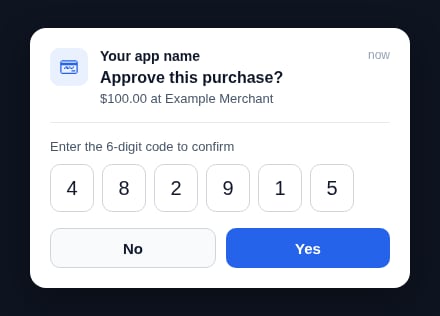
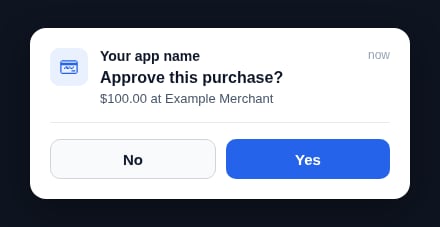 Both methods require the cardholder to have your mobile app. If your card program does not require users to have the app, Rain does not recommend either method — route those cardholders to Hosted 3DS, or to 3DS Forwarding over a non-in-app channel such as SMS or email, instead.
[In-app notifications](#deep-dive-3ds-forwarding) follow the 3DS Forwarding path, while the [push notification method](#deep-dive-out-of-band-oob) follows Out-of-Band, where you report the cardholder's decision as described in [Reporting the decision to Rain](#reporting-the-decision-to-rain).
## How 3DS authentication works
The exact sequence depends on which option your card program uses.
### Hosted 3DS flow
When your program uses Hosted 3DS, Rain handles the authentication directly with the network:
1. The cardholder begins checkout with their card details.
2. The merchant initiates a 3DS authentication request.
3. The card network (e.g. Visa) routes this request to Rain's ACS.
4. Rain's ACS triggers the authentication step by sending a one-time code (OTP) to the cardholder via SMS or email.
5. The cardholder enters the OTP they received in the authentication iFrame displayed by the merchant.
6. Rain's ACS confirms the authentication outcome back to the card network, allowing the transaction to proceed.
```mermaid theme={null}
%%{
init: {
'theme': 'base',
'themeVariables': {
'textColor': '#A6CFFF',
'primaryColor': '#212933',
'primaryTextColor': '#FFFFFF',
'primaryBorderColor': '#A6CFFF',
'secondaryColor': '#F73196',
'noteBkgColor': '#F4F3FF',
'noteBorderColor': '#F4F3FF',
'noteTextColor': '#6938EF'
},
'sequence': {
'actorFontWeight': 'bold'
}
}
}%%
sequenceDiagram
participant Cardholder
participant Merchant
participant Network as Card Network
participant Rain's ACS
Cardholder->>Merchant: Initiates payment
Merchant->>Network: Requests 3DS authentication
Network->>Rain's ACS: Routes authentication request
Rain's ACS->>Cardholder: Sends OTP directly
```
### 3DS Forwarding flow
When your program uses 3DS Forwarding, Rain forwards the authentication details to your system so you can manage the delivery:
1. The cardholder begins checkout with their card details.
2. The merchant initiates a 3DS authentication request.
3. The card network routes this request to Rain's ACS/Rain.
4. Rain sends a webhook to your system containing the OTP and transaction details, enabling you to control the last-mile delivery experience. Rain sends it once, with no retry, and waits up to 60 seconds for your `2xx` acknowledgment, so deliver the OTP from a fast path.
5. You deliver the OTP to the cardholder via one of the supported [challenge methods](#supported-challenge-methods).
6. The cardholder enters the OTP they received in the authentication iFrame displayed by the merchant.
7. Rain confirms the authentication outcome back to the card network, allowing the transaction to proceed.
```mermaid theme={null}
%%{
init: {
'theme': 'base',
'themeVariables': {
'textColor': '#A6CFFF',
'primaryColor': '#212933',
'primaryTextColor': '#FFFFFF',
'primaryBorderColor': '#A6CFFF',
'secondaryColor': '#F73196',
'noteBkgColor': '#F4F3FF',
'noteBorderColor': '#F4F3FF',
'noteTextColor': '#6938EF'
},
'sequence': {
'actorFontWeight': 'bold'
}
}
}%%
sequenceDiagram
participant Cardholder
participant Merchant
participant Network as Card Network
participant Rain
participant You as Your System
Cardholder->>Merchant: Initiates payment
Merchant->>Network: Requests 3DS authentication
Network->>Rain: Routes authentication request
Rain->>You: Sends webhook with OTP & challenge data
You->>Cardholder: Delivers OTP via requested challenge method
```
### Push Notifications (OOB) flow
When your program uses Push Notifications, Rain forwards the challenge to your system, your app shows an approve/deny prompt, and you report the decision back to Rain. There is no OTP to deliver. The steps below show the push notifications method. Biometric authentication follows the same overall pattern — Rain sends the webhook and you report the decision through [`/3ds`](#reporting-the-decision-to-rain) — with your app's biometric check standing in for the push approve/deny prompt in step 5:
1. The cardholder begins checkout with their card details.
2. The merchant initiates a 3DS authentication request.
3. The card network routes this request to Rain/Rain's ACS.
4. Rain sends a webhook to inform your system that a 3DS transaction has been initiated.
5. Your app sends a push notification to the cardholder with an approve/deny prompt.
6. The cardholder approves or declines in your app.
7. You call Rain's [`/3ds`](#reporting-the-decision-to-rain) endpoint to report the decision, and the transaction is approved or declined accordingly.
8. You call Rain's `/challenge-profile` endpoint (available soon) to migrate the user's cards onto the new 3DS flow, once they're on the correct app version.
```mermaid theme={null}
%%{
init: {
'theme': 'base',
'themeVariables': {
'textColor': '#A6CFFF',
'primaryColor': '#212933',
'primaryTextColor': '#FFFFFF',
'primaryBorderColor': '#A6CFFF',
'secondaryColor': '#F73196',
'noteBkgColor': '#F4F3FF',
'noteBorderColor': '#F4F3FF',
'noteTextColor': '#6938EF'
},
'sequence': {
'actorFontWeight': 'bold'
}
}
}%%
sequenceDiagram
participant Cardholder
participant Merchant
participant Network as Card Network
participant Rain
participant You as Your System
Cardholder->>Merchant: Initiates payment
Merchant->>Network: Requests 3DS authentication
Network->>Rain: Routes authentication request
Rain->>You: Sends webhook to inform partner that 3DS transaction has been initiated
You->>Cardholder: Send push notification to user
Cardholder-->>You: User approves or declines in-app
You->>Rain: Call /3ds endpoint to let Rain know decision
You->>Rain: Call /challenge-profile (available soon) to migrate the user's cards onto the new 3DS flow (correct app version)
```
## Deep dive: 3DS Forwarding
3DS Forwarding is the path to take if you want more ownership over the last-mile delivery of the OTP.
### Why partners choose Forwarding
* **Better deliverability** — You're not limited to SMS or email, so you avoid deliverability gaps.
* **Full customization** — You control the copy, branding, localization, and channel — SMS, email, WhatsApp, Telegram, or [in-app](#in-app-notifications-vs-push-notifications).
* **More data and control** — You get direct visibility into deliverability rates and challenge volume, rather than relying on Rain to investigate issues on your behalf. You choose which provider you want to use (e.g. Twilio) and you have the power to fix things when they aren't working. On the flip side, Rain has limited visibility into why 3DS isn't working or why a transaction failed. If you implement 3DS Forwarding, you own the responsibility to ensure the feature and controls are operating as expected.
Because you own delivery, it's crucial to have your own monitoring and alarms in place so you can catch and resolve issues quickly.
### What Forwarding requires from you
Forwarding shifts ownership of delivery to you. Before choosing this path, make sure your team is ready to take on:
* Owning the messaging provider account (for example, Twilio) for SMS or WhatsApp, or your own email service.
* Ongoing responsibility for deliverability — monitoring failures, retries, and any provider-side issues.
* Owning the challenge/OTP delivery experience, whether that's an SMS template, email design, or in-app screen.
* Any compliance requirements tied to the channels and jurisdictions you operate in.
### How it works
At a high level: the cardholder attempts a purchase, a 3DS challenge is triggered, and instead of being delivered directly to the cardholder, the challenge request is forwarded to you through a webhook. You then deliver the code or prompt to the cardholder through your own channel, and the cardholder completes authentication as usual. See the [3DS Forwarding flow](#3ds-forwarding-flow) diagram above.
### Implementation path
Majority of our partners have 2 challenge methods.
Enterprise tier partners can brand and customize the choice and challenge screens.
If you'd like the choice screen and challenge screen to include your logo, send Rain a PNG of your logo, and Rain will set this up.
If you'd like to customize your challenge screen further, send Rain the desired look so we can mock it as closely as possible without back-and-forths. Use a similar format to the template below, add your logo, and change the background color.
Both methods require the cardholder to have your mobile app. If your card program does not require users to have the app, Rain does not recommend either method — route those cardholders to Hosted 3DS, or to 3DS Forwarding over a non-in-app channel such as SMS or email, instead.
[In-app notifications](#deep-dive-3ds-forwarding) follow the 3DS Forwarding path, while the [push notification method](#deep-dive-out-of-band-oob) follows Out-of-Band, where you report the cardholder's decision as described in [Reporting the decision to Rain](#reporting-the-decision-to-rain).
## How 3DS authentication works
The exact sequence depends on which option your card program uses.
### Hosted 3DS flow
When your program uses Hosted 3DS, Rain handles the authentication directly with the network:
1. The cardholder begins checkout with their card details.
2. The merchant initiates a 3DS authentication request.
3. The card network (e.g. Visa) routes this request to Rain's ACS.
4. Rain's ACS triggers the authentication step by sending a one-time code (OTP) to the cardholder via SMS or email.
5. The cardholder enters the OTP they received in the authentication iFrame displayed by the merchant.
6. Rain's ACS confirms the authentication outcome back to the card network, allowing the transaction to proceed.
```mermaid theme={null}
%%{
init: {
'theme': 'base',
'themeVariables': {
'textColor': '#A6CFFF',
'primaryColor': '#212933',
'primaryTextColor': '#FFFFFF',
'primaryBorderColor': '#A6CFFF',
'secondaryColor': '#F73196',
'noteBkgColor': '#F4F3FF',
'noteBorderColor': '#F4F3FF',
'noteTextColor': '#6938EF'
},
'sequence': {
'actorFontWeight': 'bold'
}
}
}%%
sequenceDiagram
participant Cardholder
participant Merchant
participant Network as Card Network
participant Rain's ACS
Cardholder->>Merchant: Initiates payment
Merchant->>Network: Requests 3DS authentication
Network->>Rain's ACS: Routes authentication request
Rain's ACS->>Cardholder: Sends OTP directly
```
### 3DS Forwarding flow
When your program uses 3DS Forwarding, Rain forwards the authentication details to your system so you can manage the delivery:
1. The cardholder begins checkout with their card details.
2. The merchant initiates a 3DS authentication request.
3. The card network routes this request to Rain's ACS/Rain.
4. Rain sends a webhook to your system containing the OTP and transaction details, enabling you to control the last-mile delivery experience. Rain sends it once, with no retry, and waits up to 60 seconds for your `2xx` acknowledgment, so deliver the OTP from a fast path.
5. You deliver the OTP to the cardholder via one of the supported [challenge methods](#supported-challenge-methods).
6. The cardholder enters the OTP they received in the authentication iFrame displayed by the merchant.
7. Rain confirms the authentication outcome back to the card network, allowing the transaction to proceed.
```mermaid theme={null}
%%{
init: {
'theme': 'base',
'themeVariables': {
'textColor': '#A6CFFF',
'primaryColor': '#212933',
'primaryTextColor': '#FFFFFF',
'primaryBorderColor': '#A6CFFF',
'secondaryColor': '#F73196',
'noteBkgColor': '#F4F3FF',
'noteBorderColor': '#F4F3FF',
'noteTextColor': '#6938EF'
},
'sequence': {
'actorFontWeight': 'bold'
}
}
}%%
sequenceDiagram
participant Cardholder
participant Merchant
participant Network as Card Network
participant Rain
participant You as Your System
Cardholder->>Merchant: Initiates payment
Merchant->>Network: Requests 3DS authentication
Network->>Rain: Routes authentication request
Rain->>You: Sends webhook with OTP & challenge data
You->>Cardholder: Delivers OTP via requested challenge method
```
### Push Notifications (OOB) flow
When your program uses Push Notifications, Rain forwards the challenge to your system, your app shows an approve/deny prompt, and you report the decision back to Rain. There is no OTP to deliver. The steps below show the push notifications method. Biometric authentication follows the same overall pattern — Rain sends the webhook and you report the decision through [`/3ds`](#reporting-the-decision-to-rain) — with your app's biometric check standing in for the push approve/deny prompt in step 5:
1. The cardholder begins checkout with their card details.
2. The merchant initiates a 3DS authentication request.
3. The card network routes this request to Rain/Rain's ACS.
4. Rain sends a webhook to inform your system that a 3DS transaction has been initiated.
5. Your app sends a push notification to the cardholder with an approve/deny prompt.
6. The cardholder approves or declines in your app.
7. You call Rain's [`/3ds`](#reporting-the-decision-to-rain) endpoint to report the decision, and the transaction is approved or declined accordingly.
8. You call Rain's `/challenge-profile` endpoint (available soon) to migrate the user's cards onto the new 3DS flow, once they're on the correct app version.
```mermaid theme={null}
%%{
init: {
'theme': 'base',
'themeVariables': {
'textColor': '#A6CFFF',
'primaryColor': '#212933',
'primaryTextColor': '#FFFFFF',
'primaryBorderColor': '#A6CFFF',
'secondaryColor': '#F73196',
'noteBkgColor': '#F4F3FF',
'noteBorderColor': '#F4F3FF',
'noteTextColor': '#6938EF'
},
'sequence': {
'actorFontWeight': 'bold'
}
}
}%%
sequenceDiagram
participant Cardholder
participant Merchant
participant Network as Card Network
participant Rain
participant You as Your System
Cardholder->>Merchant: Initiates payment
Merchant->>Network: Requests 3DS authentication
Network->>Rain: Routes authentication request
Rain->>You: Sends webhook to inform partner that 3DS transaction has been initiated
You->>Cardholder: Send push notification to user
Cardholder-->>You: User approves or declines in-app
You->>Rain: Call /3ds endpoint to let Rain know decision
You->>Rain: Call /challenge-profile (available soon) to migrate the user's cards onto the new 3DS flow (correct app version)
```
## Deep dive: 3DS Forwarding
3DS Forwarding is the path to take if you want more ownership over the last-mile delivery of the OTP.
### Why partners choose Forwarding
* **Better deliverability** — You're not limited to SMS or email, so you avoid deliverability gaps.
* **Full customization** — You control the copy, branding, localization, and channel — SMS, email, WhatsApp, Telegram, or [in-app](#in-app-notifications-vs-push-notifications).
* **More data and control** — You get direct visibility into deliverability rates and challenge volume, rather than relying on Rain to investigate issues on your behalf. You choose which provider you want to use (e.g. Twilio) and you have the power to fix things when they aren't working. On the flip side, Rain has limited visibility into why 3DS isn't working or why a transaction failed. If you implement 3DS Forwarding, you own the responsibility to ensure the feature and controls are operating as expected.
Because you own delivery, it's crucial to have your own monitoring and alarms in place so you can catch and resolve issues quickly.
### What Forwarding requires from you
Forwarding shifts ownership of delivery to you. Before choosing this path, make sure your team is ready to take on:
* Owning the messaging provider account (for example, Twilio) for SMS or WhatsApp, or your own email service.
* Ongoing responsibility for deliverability — monitoring failures, retries, and any provider-side issues.
* Owning the challenge/OTP delivery experience, whether that's an SMS template, email design, or in-app screen.
* Any compliance requirements tied to the channels and jurisdictions you operate in.
### How it works
At a high level: the cardholder attempts a purchase, a 3DS challenge is triggered, and instead of being delivered directly to the cardholder, the challenge request is forwarded to you through a webhook. You then deliver the code or prompt to the cardholder through your own channel, and the cardholder completes authentication as usual. See the [3DS Forwarding flow](#3ds-forwarding-flow) diagram above.
### Implementation path
Majority of our partners have 2 challenge methods.
Enterprise tier partners can brand and customize the choice and challenge screens.
If you'd like the choice screen and challenge screen to include your logo, send Rain a PNG of your logo, and Rain will set this up.
If you'd like to customize your challenge screen further, send Rain the desired look so we can mock it as closely as possible without back-and-forths. Use a similar format to the template below, add your logo, and change the background color.
 Rain creates your challenge profile and methods.
Set up your own delivery infrastructure — for example, a Twilio account for SMS/WhatsApp, or an existing email service.
Confirm which webhook URL you'll be listening on for our `challenge.requested` webhooks. Rain configures this as a webhook URL override in the production environment.
Stand up the endpoint that receives Rain's `challenge.requested` webhook and delivers the OTP:
1. **Verify the request** is from Rain — compute the HMAC-SHA256 of the request body with your webhook signing key and compare it to the `Signature` header. See [Webhook security and signing](/docs/set-up-webhooks#webhook-security-and-signing).
2. **Parse the challenge** — `challenge.oneTimePassword`, `challenge.timeToLive`, plus the `transaction` and `card` details.
3. **Deliver the code** — look up the cardholder by `card.id` and send the OTP on the channel that matches `deliveryMethod` (SMS, email, WhatsApp…).
4. **Respond `200`** with `status: "ok"`. Optionally include the masked destination — `phoneNumberTail` for SMS or `email` for email — so the challenge screen can show the cardholder where the code was sent. See [Webhook response](#webhook-response) below.
5. **Rollout** — see below for info
The implementation for rollout is up to you. Use the `/challenge-profile` endpoint (available soon) to migrate a user's cards onto the new 3DS forwarding flow. While `/challenge-profile` is being finalized, you can begin building the rest of your integration. See [Testing and rollout](#testing-and-rollout).
See the [webhook payload](#webhook-payload) and [implementation example](#implementation-example) below for the full schema and a runnable handler.
Sandbox testing is not end-to-end, but it lets you test the `challenge.requested` webhook. Confirm your handler responds with a `200`.
To trigger a challenge, open the **Transactions** tab in sandbox and select **Simulate 3DS challenge**. This sends a `challenge.requested` webhook to your configured endpoint. For the API route, see the [3DS transaction simulator](/docs/simulating-transactions/3ds-challenges).
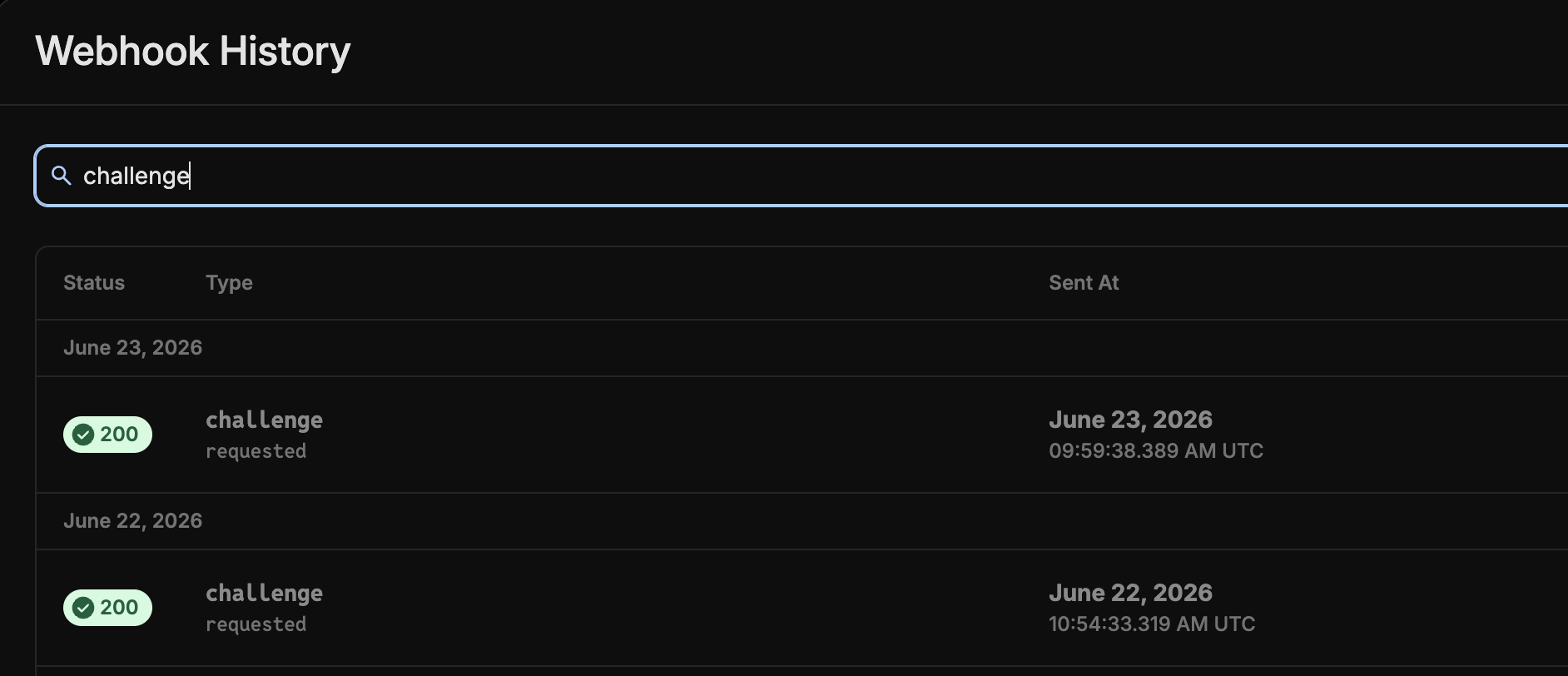
Once your webhook responds with a `200`, you are ready for production testing. Send a screenshot of the `200` response from your webhook history to your account or implementation manager.
Rain creates your challenge profile and methods.
Set up your own delivery infrastructure — for example, a Twilio account for SMS/WhatsApp, or an existing email service.
Confirm which webhook URL you'll be listening on for our `challenge.requested` webhooks. Rain configures this as a webhook URL override in the production environment.
Stand up the endpoint that receives Rain's `challenge.requested` webhook and delivers the OTP:
1. **Verify the request** is from Rain — compute the HMAC-SHA256 of the request body with your webhook signing key and compare it to the `Signature` header. See [Webhook security and signing](/docs/set-up-webhooks#webhook-security-and-signing).
2. **Parse the challenge** — `challenge.oneTimePassword`, `challenge.timeToLive`, plus the `transaction` and `card` details.
3. **Deliver the code** — look up the cardholder by `card.id` and send the OTP on the channel that matches `deliveryMethod` (SMS, email, WhatsApp…).
4. **Respond `200`** with `status: "ok"`. Optionally include the masked destination — `phoneNumberTail` for SMS or `email` for email — so the challenge screen can show the cardholder where the code was sent. See [Webhook response](#webhook-response) below.
5. **Rollout** — see below for info
The implementation for rollout is up to you. Use the `/challenge-profile` endpoint (available soon) to migrate a user's cards onto the new 3DS forwarding flow. While `/challenge-profile` is being finalized, you can begin building the rest of your integration. See [Testing and rollout](#testing-and-rollout).
See the [webhook payload](#webhook-payload) and [implementation example](#implementation-example) below for the full schema and a runnable handler.
Sandbox testing is not end-to-end, but it lets you test the `challenge.requested` webhook. Confirm your handler responds with a `200`.
To trigger a challenge, open the **Transactions** tab in sandbox and select **Simulate 3DS challenge**. This sends a `challenge.requested` webhook to your configured endpoint. For the API route, see the [3DS transaction simulator](/docs/simulating-transactions/3ds-challenges).
Once your webhook responds with a `200`, you are ready for production testing. Send a screenshot of the `200` response from your webhook history to your account or implementation manager.
 Test end-to-end on a small number of production cards before rolling out broadly. Send Rain the production card IDs you want to test. An example merchant you can test 3DS with is [alohafromdeer.com](https://alohafromdeer.com/), as long as you test a transaction over \$75.
Once testing is confirmed, Rain enables Forwarding for your account in production.
### Webhook payload
Rain sends the `challenge.requested` webhook to your configured endpoint when a 3DS challenge is triggered. Rain uses this same webhook for both Forwarding and Out-of-Band — the `deliveryMethod` field tells you which flow a challenge belongs to. `SMS`, `EMAIL`, `WHATSAPP`, or `OTHER` means you deliver an OTP (Forwarding), while `PUSH` means you show an approve/deny prompt (Out-of-Band). If your program uses both flows, branch on `deliveryMethod`. See [Webhook payload (Forwarding and OOB)](#webhook-payload-forwarding-and-oob) for the full field-by-field schema and example payloads, and the [`challenge.requested` webhook reference](/changelog/webhooks/v2/challenge/requested) for version history.
### Webhook response
Reply to the webhook with HTTP `200` and a JSON body that confirms delivery. You can also include the masked destination the code was sent to — it's optional, but a nice touch: it's displayed on the challenge screen so the cardholder knows where to look (for example, "Enter the code we sent to your mobile number ending in 1234").
| Field | Type | Required | Notes |
| ----------------- | ------ | ---------------------------- | --------------------------------------------------------------------------------------------------------------------------------------------------------------------- |
| `status` | string | Yes | `ok` — confirms you processed the challenge and sent the code. Must be paired with a `2XX` HTTP status code |
| `phoneNumberTail` | string | Optional, for SMS delivery | The last 4 digits of the phone number the passcode was sent to — identifies the phone number to the cardholder. Must be exactly 4 characters, or the field is ignored |
| `email` | string | Optional, for Email delivery | A masked version of the email address the passcode was sent to — identifies the email to the cardholder |
```json SMS delivery theme={null}
{
"status": "ok",
"phoneNumberTail": "1234"
}
```
```json Email delivery theme={null}
{
"status": "ok",
"email": "j***e@example.com"
}
```
If you can't deliver the code — for example, there's no phone number on file, or your provider is down — respond with a non-`2xx` status. Rain reports the missing details to the network so the challenge fails fast, instead of leaving the cardholder waiting on the challenge screen for a code that never arrives.
### Implementation example
```javascript theme={null}
import { createHmac } from 'crypto';
app.post('/webhooks/rain/3ds', async (req, res) => {
// 1. Verify the Signature header — an HMAC-SHA256 of the request body,
// keyed with your webhook signing API key. During key rotation, Rain may
// also send a Secondary-Signature header to compare against.
const expected = createHmac('sha256', process.env.RAIN_WEBHOOK_SIGNING_KEY)
.update(JSON.stringify(req.body))
.digest('hex');
if (req.headers['signature'] !== expected) {
return res.status(401).json({ error: 'Invalid signature' });
}
const { body } = req.body;
const { challenge, transaction, card, deliveryMethod } = body;
try {
// 2. Look up your user using Rain's card ID
const user = await getUserByCardId(card.id);
// 3. Build your message
const message = `Your verification code is ${challenge.oneTimePassword}
Transaction: ${transaction.amount} ${transaction.currency} at
${transaction.merchantName} Code expires in ${challenge.timeToLive} seconds.`;
// 4. Send via user's preferred channel, then respond to Rain with the
// masked destination so the challenge screen can display it
if (deliveryMethod === 'SMS') {
await sendSMS(user.phone, message);
return res.status(200).json({
status: 'ok',
phoneNumberTail: user.phone.slice(-4),
});
} else if (deliveryMethod === 'EMAIL') {
await sendEmail(user.email, message);
return res.status(200).json({
status: 'ok',
email: maskEmail(user.email), // e.g. j***e@example.com
});
} else if (deliveryMethod === 'OTHER') {
await sendOther(user.id, {
title: 'Verify Transaction',
body: message,
});
return res.status(200).json({ status: 'ok' });
}
} catch (error) {
// A non-2xx response tells Rain delivery failed, so the challenge
// fails fast instead of leaving the cardholder waiting for a code
console.error('Error delivering OTP:', error);
return res.status(500).json({ error: 'Failed to deliver OTP' });
}
});
```
## Deep dive: Out-of-Band (OOB)
This deep dive covers both Out-of-Band methods. Push notifications is the primary, fully supported method. Biometric authentication has limited Rain support and is covered at the end of this section.
3DS Push Notifications are a push notification you send to your cardholder when a merchant requests 3DS. There is no OTP involved.
If your team has (or is building) a mobile app and fraud protection is your top priority, Push Notifications may be a better fit than Forwarding. We've also noticed that OOB has the highest acceptance rate of all challenge methods.
Because this typically requires an app release, plan for a longer implementation timeline than Forwarding — often a month rather than weeks. Sandbox testing tools are available so you can validate the experience before going live.
### Why partners choose Push Notifications
* **Higher deliverability** — Since there's no dependency on Twilio or email, deliverability is controlled directly in the app experience. No OTP is required.
* **Works anywhere** — No country-level blocks on SMS or email delivery, since 3DS becomes an in-app experience.
* **Full customization** — You control the copy, branding, and look of the notification.
* **More data and control** — Like Forwarding, Push Notifications give you direct visibility into deliverability rates and challenge volume, so you're not waiting on Rain to investigate issues on your behalf. You control how the push notification is sent, which means you can diagnose and fix issues on your own timeline rather than through a support queue. To get the most out of that control, we recommend having your own monitoring and alerting in place.
### What Push Notifications requires from you
Push Notifications shift ownership of delivery to you. Before choosing this path, make sure your team is ready to take on:
* Owning the push notification implementation. You need to make sure the notification is working as intended.
* Ongoing responsibility for deliverability — monitoring failures, retries, and any provider-side issues.
* Any compliance requirements tied to the channels and jurisdictions you operate in.
### How it works
At a high level: the cardholder attempts a purchase, a 3DS challenge is triggered, and the challenge request is forwarded to you through a webhook. Your app then displays an approve/deny prompt, and you report the cardholder's decision back to Rain through a dedicated endpoint before the challenge expires. There is no OTP involved. See the [Push Notifications (OOB) flow](#push-notifications-oob-flow) diagram above.
Test end-to-end on a small number of production cards before rolling out broadly. Send Rain the production card IDs you want to test. An example merchant you can test 3DS with is [alohafromdeer.com](https://alohafromdeer.com/), as long as you test a transaction over \$75.
Once testing is confirmed, Rain enables Forwarding for your account in production.
### Webhook payload
Rain sends the `challenge.requested` webhook to your configured endpoint when a 3DS challenge is triggered. Rain uses this same webhook for both Forwarding and Out-of-Band — the `deliveryMethod` field tells you which flow a challenge belongs to. `SMS`, `EMAIL`, `WHATSAPP`, or `OTHER` means you deliver an OTP (Forwarding), while `PUSH` means you show an approve/deny prompt (Out-of-Band). If your program uses both flows, branch on `deliveryMethod`. See [Webhook payload (Forwarding and OOB)](#webhook-payload-forwarding-and-oob) for the full field-by-field schema and example payloads, and the [`challenge.requested` webhook reference](/changelog/webhooks/v2/challenge/requested) for version history.
### Webhook response
Reply to the webhook with HTTP `200` and a JSON body that confirms delivery. You can also include the masked destination the code was sent to — it's optional, but a nice touch: it's displayed on the challenge screen so the cardholder knows where to look (for example, "Enter the code we sent to your mobile number ending in 1234").
| Field | Type | Required | Notes |
| ----------------- | ------ | ---------------------------- | --------------------------------------------------------------------------------------------------------------------------------------------------------------------- |
| `status` | string | Yes | `ok` — confirms you processed the challenge and sent the code. Must be paired with a `2XX` HTTP status code |
| `phoneNumberTail` | string | Optional, for SMS delivery | The last 4 digits of the phone number the passcode was sent to — identifies the phone number to the cardholder. Must be exactly 4 characters, or the field is ignored |
| `email` | string | Optional, for Email delivery | A masked version of the email address the passcode was sent to — identifies the email to the cardholder |
```json SMS delivery theme={null}
{
"status": "ok",
"phoneNumberTail": "1234"
}
```
```json Email delivery theme={null}
{
"status": "ok",
"email": "j***e@example.com"
}
```
If you can't deliver the code — for example, there's no phone number on file, or your provider is down — respond with a non-`2xx` status. Rain reports the missing details to the network so the challenge fails fast, instead of leaving the cardholder waiting on the challenge screen for a code that never arrives.
### Implementation example
```javascript theme={null}
import { createHmac } from 'crypto';
app.post('/webhooks/rain/3ds', async (req, res) => {
// 1. Verify the Signature header — an HMAC-SHA256 of the request body,
// keyed with your webhook signing API key. During key rotation, Rain may
// also send a Secondary-Signature header to compare against.
const expected = createHmac('sha256', process.env.RAIN_WEBHOOK_SIGNING_KEY)
.update(JSON.stringify(req.body))
.digest('hex');
if (req.headers['signature'] !== expected) {
return res.status(401).json({ error: 'Invalid signature' });
}
const { body } = req.body;
const { challenge, transaction, card, deliveryMethod } = body;
try {
// 2. Look up your user using Rain's card ID
const user = await getUserByCardId(card.id);
// 3. Build your message
const message = `Your verification code is ${challenge.oneTimePassword}
Transaction: ${transaction.amount} ${transaction.currency} at
${transaction.merchantName} Code expires in ${challenge.timeToLive} seconds.`;
// 4. Send via user's preferred channel, then respond to Rain with the
// masked destination so the challenge screen can display it
if (deliveryMethod === 'SMS') {
await sendSMS(user.phone, message);
return res.status(200).json({
status: 'ok',
phoneNumberTail: user.phone.slice(-4),
});
} else if (deliveryMethod === 'EMAIL') {
await sendEmail(user.email, message);
return res.status(200).json({
status: 'ok',
email: maskEmail(user.email), // e.g. j***e@example.com
});
} else if (deliveryMethod === 'OTHER') {
await sendOther(user.id, {
title: 'Verify Transaction',
body: message,
});
return res.status(200).json({ status: 'ok' });
}
} catch (error) {
// A non-2xx response tells Rain delivery failed, so the challenge
// fails fast instead of leaving the cardholder waiting for a code
console.error('Error delivering OTP:', error);
return res.status(500).json({ error: 'Failed to deliver OTP' });
}
});
```
## Deep dive: Out-of-Band (OOB)
This deep dive covers both Out-of-Band methods. Push notifications is the primary, fully supported method. Biometric authentication has limited Rain support and is covered at the end of this section.
3DS Push Notifications are a push notification you send to your cardholder when a merchant requests 3DS. There is no OTP involved.
If your team has (or is building) a mobile app and fraud protection is your top priority, Push Notifications may be a better fit than Forwarding. We've also noticed that OOB has the highest acceptance rate of all challenge methods.
Because this typically requires an app release, plan for a longer implementation timeline than Forwarding — often a month rather than weeks. Sandbox testing tools are available so you can validate the experience before going live.
### Why partners choose Push Notifications
* **Higher deliverability** — Since there's no dependency on Twilio or email, deliverability is controlled directly in the app experience. No OTP is required.
* **Works anywhere** — No country-level blocks on SMS or email delivery, since 3DS becomes an in-app experience.
* **Full customization** — You control the copy, branding, and look of the notification.
* **More data and control** — Like Forwarding, Push Notifications give you direct visibility into deliverability rates and challenge volume, so you're not waiting on Rain to investigate issues on your behalf. You control how the push notification is sent, which means you can diagnose and fix issues on your own timeline rather than through a support queue. To get the most out of that control, we recommend having your own monitoring and alerting in place.
### What Push Notifications requires from you
Push Notifications shift ownership of delivery to you. Before choosing this path, make sure your team is ready to take on:
* Owning the push notification implementation. You need to make sure the notification is working as intended.
* Ongoing responsibility for deliverability — monitoring failures, retries, and any provider-side issues.
* Any compliance requirements tied to the channels and jurisdictions you operate in.
### How it works
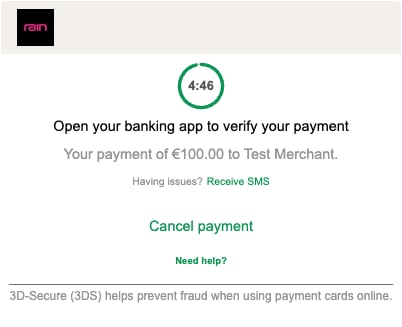
At a high level: the cardholder attempts a purchase, a 3DS challenge is triggered, and the challenge request is forwarded to you through a webhook. Your app then displays an approve/deny prompt, and you report the cardholder's decision back to Rain through a dedicated endpoint before the challenge expires. There is no OTP involved. See the [Push Notifications (OOB) flow](#push-notifications-oob-flow) diagram above.
 ### Implementation path
On the Push Notifications path, the challenge method is the push notification itself. Startup tier partners must use Push Notifications as their only challenge method. Enterprise tier partners can optionally add other challenge methods alongside Push Notifications, which is why this step is optional and applies to Enterprise tier only.
For Enterprise partners, if you'd like the choice screen and challenge screen to include your logo, send Rain a PNG of your logo, and Rain will set this up.
Rain creates your challenge profile and methods.
Confirm which webhook URL you'll be listening on for our `challenge.requested` webhooks. Rain configures this as a webhook URL override in the production environment.
Stand up the endpoint that receives Rain's `challenge.requested` webhook and drives the approve/deny prompt:
1. **Verify the request** is from Rain — compute the HMAC-SHA256 of the request body with your webhook signing key and compare it to the `Signature` header. See [Webhook security and signing](/docs/set-up-webhooks#webhook-security-and-signing).
2. **Parse the challenge** — the `transaction` and `card` details (there's no OTP to deliver for push). Persist `challenge.id` and `transaction.id` — you send both back when you report the decision.
3. **Deliver the prompt** — look up the cardholder by `card.id` and send a push notification with an approve/deny prompt. When they respond, call [`POST /v1/issuing/transactions/3ds`](#reporting-the-decision-to-rain) to report the decision to Rain.
4. **Respond `200`** to acknowledge the webhook.
5. **Rollout** — see [Rollout](#rollout) below for info
The most important part of this integration is ensuring that **only users with the correct app version can authenticate via Push Notifications** — this implementation is up to you. Use the `/challenge-profile` endpoint (available soon) to migrate a user's cards onto the new 3DS Push Notifications flow.
See the [webhook payload](#webhook-payload-forwarding-and-oob) and [decision callback](#reporting-the-decision-to-rain) below for the full schemas and examples.
Sandbox testing is not end-to-end, but it lets you test the `challenge.requested` webhook. Confirm your handler responds with a `200`.
You cannot test the decision endpoint `POST /v1/issuing/transactions/3ds` in sandbox. Calling this endpoint in sandbox returns a `4xx` error.
To trigger a challenge, open the **Transactions** tab in sandbox and select **Simulate 3DS challenge**. This sends a `challenge.requested` webhook to your configured endpoint. For the API route, see the [3DS transaction simulator](/docs/simulating-transactions/3ds-challenges).
Once your webhook responds with a `200`, you are ready for production testing. Send a screenshot of the `200` response from your webhook history to your account or implementation manager.
Test end-to-end on a small number of production cards before rolling out broadly. Send Rain the production card IDs you want to test. An example merchant you can test 3DS with is [alohafromdeer.com](https://alohafromdeer.com/), as long as you test a transaction over \$75.
Once testing is confirmed, Rain enables Push Notifications for your account in production.
### Webhook payload (Forwarding and OOB)
Rain delivers the `challenge.requested` webhook to your configured webhook URL whenever a cardholder needs to complete a 3DS challenge — it is the same webhook for both Forwarding and Out-of-Band. The `deliveryMethod` field tells you which flow the challenge belongs to: `SMS`, `EMAIL`, `WHATSAPP`, or `OTHER` means you deliver an OTP (Forwarding), while `PUSH` means you show an approve/deny prompt (OOB). If your program uses both flows, branch on `deliveryMethod`. It is delivered like every other Rain webhook — HMAC-SHA256 signed, over HTTPS — and you should acknowledge it with HTTP `200`. See [Set up webhooks](/docs/set-up-webhooks) for signing and URL requirements, and the [`challenge.requested` webhook reference](/changelog/webhooks/v2/challenge/requested) for version history.
Unlike most Rain webhooks, `challenge.requested` is sent synchronously while the cardholder waits: Rain makes **one attempt with no retries**. Respond within a few seconds — a timeout fails the challenge.
**Envelope**
| Field | Value |
| ---------- | --------------------------------------------------------------------------- |
| `resource` | `challenge` |
| `action` | `requested` |
| `version` | `2.0.0` — may be absent for some tenants; treat it as optional when parsing |
| `id` | A unique per-delivery UUID (distinct from `body.id`) |
**`body` schema**
| Field | Type | Notes |
| ----------------------------- | ----------------- | ----------------------------------------------------------------------------------------------------------------------------------------------------------------------------------------------------------------------- |
| `challenge.startTime` | string | ISO 8601 timestamp the challenge started |
| `challenge.expiryTime` | string | ISO 8601 deadline — the decision must be reported before this time |
| `challenge.timeToLive` | number | Seconds the challenge remains valid |
| `challenge.id` | string | **OOB only** — not sent for Forwarding challenges (it's only needed to call [`/3ds`](#reporting-the-decision-to-rain), which Forwarding doesn't use). Challenge identifier — echo back as `challengeId` in the callback |
| `challenge.oneTimePassword` | string (optional) | The OTP to deliver for Forwarding challenges. **Absent for OOB** — there is no code to show the cardholder |
| `transaction.amount` | number | Amount in minor units (e.g. cents) |
| `transaction.currency` | string | ISO currency code |
| `transaction.merchantName` | string | Merchant display name |
| `transaction.merchantCountry` | string | Merchant country |
| `transaction.id` | string | **OOB only** — not sent for Forwarding challenges. Transaction identifier — echo back as `apataTransactionId` in the callback |
| `card.id` | string | Rain card ID the challenge is for |
| `deliveryMethod` | string | `SMS`, `EMAIL`, `WHATSAPP`, or `OTHER` (Forwarding), or `PUSH` (OOB) |
| `id` | string | Unique ID for this webhook notification (use for idempotency) |
**Examples**
```json Forwarding (OTP) theme={null}
{
"resource": "challenge",
"action": "requested",
"version": "2.0.0",
"body": {
"challenge": {
"startTime": "2026-06-02T10:00:00.000Z",
"expiryTime": "2026-06-02T10:05:00.000Z",
"timeToLive": 300,
"oneTimePassword": "597931"
},
"transaction": {
"amount": 4999,
"currency": "USD",
"merchantName": "Example Store",
"merchantCountry": "US"
},
"card": {
"id": "f0e1d2c3-1111-2222-3333-444455556666"
},
"deliveryMethod": "SMS",
"id": "99999999-aaaa-bbbb-cccc-dddddddddddd"
},
"id": "55555555-1111-2222-3333-444444444444"
}
```
```json Out-of-Band (OOB) theme={null}
{
"resource": "challenge",
"action": "requested",
"version": "2.0.0",
"body": {
"challenge": {
"startTime": "2026-06-02T10:00:00.000Z",
"expiryTime": "2026-06-02T10:05:00.000Z",
"timeToLive": 300,
"id": "a1b2c3d4-0000-0000-0000-000000000001"
},
"transaction": {
"amount": 4999,
"currency": "USD",
"merchantName": "Example Store",
"merchantCountry": "US",
"id": "a1b2c3d4-0000-0000-0000-000000000002"
},
"card": {
"id": "f0e1d2c3-1111-2222-3333-444455556666"
},
"deliveryMethod": "PUSH",
"id": "99999999-aaaa-bbbb-cccc-dddddddddddd"
},
"id": "55555555-1111-2222-3333-444444444444"
}
```
The `amount` field is the transaction amount expressed in the currency's minor unit (for example, cents). It is always paired with the ISO 4217 `currency` code. For example, `"amount": 1000` with `"currency": "USD"` means \$10.00. Note that this differs from Rain's transaction webhooks, where amounts are always multiplied by 100 regardless of currency — the two formats diverge for zero-decimal currencies like KRW and JPY.
For OOB challenges, `oneTimePassword` is **not** included — do not display a code. Show an approve/deny prompt instead, and persist `challenge.id` and `transaction.id`: you must send both back in the callback.
### Reporting the decision to Rain
After the cardholder approves or denies, report the decision to Rain by calling `POST /v1/issuing/transactions/3ds`.
* **Auth** — An API key **and** tenant auth are both required. The key needs the `transactionsAndDisputes` resource with `write` access.
* **Access** — The endpoint is gated: only tenants enabled for push notifications can call it (others receive `403`).
**Request body**
| Field | Type | Required | Notes |
| -------------------- | ------------- | -------- | --------------------------------------------- |
| `apataTransactionId` | string (uuid) | Yes | The `transaction.id` from the inbound webhook |
| `challengeId` | string (uuid) | Yes | The `challenge.id` from the inbound webhook |
| `decision` | enum | Yes | `authenticate` (approve) or `decline` (deny) |
**Example request**
```bash theme={null}
curl -X POST "https://api.rain.xyz/v1/issuing/transactions/3ds" \
-H "api-key: $RAIN_API_KEY" \
-H "Content-Type: application/json" \
-d '{
"apataTransactionId": "a1b2c3d4-0000-0000-0000-000000000002",
"challengeId": "a1b2c3d4-0000-0000-0000-000000000001",
"decision": "authenticate"
}'
```
**Responses**
```json theme={null}
// decision: "authenticate"
{ "status": "Transaction authenticated" }
// decision: "decline"
{ "status": "Transaction declined" }
```
Report the decision **before** `challenge.expiryTime`. Expired, unknown, or otherwise invalid challenges are rejected and surfaced as an error response. Unexpected failures return `500` with `"Error authenticating 3DS"`.
### Rollout
The most important part of this integration is ensuring that **only users with the correct app version can authenticate via Push Notifications** — this implementation is up to you. For example, you could run a worker that listens for cardholders who update their app, or check the user's app version when you receive the `challenge.requested` webhook. Once a user is on a supported app version, use the `/challenge-profile` endpoint (available soon) to switch their cards between OTP and Push Notifications.
The `/challenge-profile` endpoint is currently being finalized and isn't available yet — in the meantime, you can begin building the rest of your integration. We'll update this page with full endpoint documentation when it ships.
### Biometric authentication (limited Rain support)
Biometric authentication is a second OOB method: instead of a push approve/deny tap, your app verifies the cardholder with a biometric check (for example, a fingerprint or face scan on the cardholder's device) before you report the decision.
It uses the same OOB flow as push notifications — Rain sends the `challenge.requested` webhook, your app performs the verification, and you report the resulting approve/deny decision by calling the [`/3ds`](#reporting-the-decision-to-rain) endpoint. There is no OTP. The implementation steps match the push [Implementation path](#implementation-path-1) above, differing only in how your app collects the cardholder's decision.
Rain currently has limited support for biometric authentication. Rain does not provide or manage the biometric mechanism — you implement and own it in your app, and Rain receives only the final decision through [`/3ds`](#reporting-the-decision-to-rain). Contact your Rain account manager before planning a biometric integration.
## Testing and rollout
* **Test before committing.** All three paths can be tested on a small number of production cards before a broad rollout — you don't need to implement your entire card base on day one.
* **New cards first.** By default, the updated configuration applies only to newly issued cards; existing cards remain on their original authentication path. Migrating active cards is technically possible, but it remains a high-risk manual operation. Rain is developing a streamlined transition tool to automate this process safely, and we'll share updates as soon as it's ready.
## What's Next
Trigger a 3DS authentication challenge in sandbox to test your webhook handling end to end.
See the full payload schema, field descriptions, and version history for the 3DS challenge webhook.
**Enabling 3DS Forwarding or Push Notifications:**
3DS Forwarding and Push Notifications are opt-in features that require setup. Contact your Rain account manager to have them enabled for your card program.
### Implementation path
On the Push Notifications path, the challenge method is the push notification itself. Startup tier partners must use Push Notifications as their only challenge method. Enterprise tier partners can optionally add other challenge methods alongside Push Notifications, which is why this step is optional and applies to Enterprise tier only.
For Enterprise partners, if you'd like the choice screen and challenge screen to include your logo, send Rain a PNG of your logo, and Rain will set this up.
Rain creates your challenge profile and methods.
Confirm which webhook URL you'll be listening on for our `challenge.requested` webhooks. Rain configures this as a webhook URL override in the production environment.
Stand up the endpoint that receives Rain's `challenge.requested` webhook and drives the approve/deny prompt:
1. **Verify the request** is from Rain — compute the HMAC-SHA256 of the request body with your webhook signing key and compare it to the `Signature` header. See [Webhook security and signing](/docs/set-up-webhooks#webhook-security-and-signing).
2. **Parse the challenge** — the `transaction` and `card` details (there's no OTP to deliver for push). Persist `challenge.id` and `transaction.id` — you send both back when you report the decision.
3. **Deliver the prompt** — look up the cardholder by `card.id` and send a push notification with an approve/deny prompt. When they respond, call [`POST /v1/issuing/transactions/3ds`](#reporting-the-decision-to-rain) to report the decision to Rain.
4. **Respond `200`** to acknowledge the webhook.
5. **Rollout** — see [Rollout](#rollout) below for info
The most important part of this integration is ensuring that **only users with the correct app version can authenticate via Push Notifications** — this implementation is up to you. Use the `/challenge-profile` endpoint (available soon) to migrate a user's cards onto the new 3DS Push Notifications flow.
See the [webhook payload](#webhook-payload-forwarding-and-oob) and [decision callback](#reporting-the-decision-to-rain) below for the full schemas and examples.
Sandbox testing is not end-to-end, but it lets you test the `challenge.requested` webhook. Confirm your handler responds with a `200`.
You cannot test the decision endpoint `POST /v1/issuing/transactions/3ds` in sandbox. Calling this endpoint in sandbox returns a `4xx` error.
To trigger a challenge, open the **Transactions** tab in sandbox and select **Simulate 3DS challenge**. This sends a `challenge.requested` webhook to your configured endpoint. For the API route, see the [3DS transaction simulator](/docs/simulating-transactions/3ds-challenges).
Once your webhook responds with a `200`, you are ready for production testing. Send a screenshot of the `200` response from your webhook history to your account or implementation manager.
Test end-to-end on a small number of production cards before rolling out broadly. Send Rain the production card IDs you want to test. An example merchant you can test 3DS with is [alohafromdeer.com](https://alohafromdeer.com/), as long as you test a transaction over \$75.
Once testing is confirmed, Rain enables Push Notifications for your account in production.
### Webhook payload (Forwarding and OOB)
Rain delivers the `challenge.requested` webhook to your configured webhook URL whenever a cardholder needs to complete a 3DS challenge — it is the same webhook for both Forwarding and Out-of-Band. The `deliveryMethod` field tells you which flow the challenge belongs to: `SMS`, `EMAIL`, `WHATSAPP`, or `OTHER` means you deliver an OTP (Forwarding), while `PUSH` means you show an approve/deny prompt (OOB). If your program uses both flows, branch on `deliveryMethod`. It is delivered like every other Rain webhook — HMAC-SHA256 signed, over HTTPS — and you should acknowledge it with HTTP `200`. See [Set up webhooks](/docs/set-up-webhooks) for signing and URL requirements, and the [`challenge.requested` webhook reference](/changelog/webhooks/v2/challenge/requested) for version history.
Unlike most Rain webhooks, `challenge.requested` is sent synchronously while the cardholder waits: Rain makes **one attempt with no retries**. Respond within a few seconds — a timeout fails the challenge.
**Envelope**
| Field | Value |
| ---------- | --------------------------------------------------------------------------- |
| `resource` | `challenge` |
| `action` | `requested` |
| `version` | `2.0.0` — may be absent for some tenants; treat it as optional when parsing |
| `id` | A unique per-delivery UUID (distinct from `body.id`) |
**`body` schema**
| Field | Type | Notes |
| ----------------------------- | ----------------- | ----------------------------------------------------------------------------------------------------------------------------------------------------------------------------------------------------------------------- |
| `challenge.startTime` | string | ISO 8601 timestamp the challenge started |
| `challenge.expiryTime` | string | ISO 8601 deadline — the decision must be reported before this time |
| `challenge.timeToLive` | number | Seconds the challenge remains valid |
| `challenge.id` | string | **OOB only** — not sent for Forwarding challenges (it's only needed to call [`/3ds`](#reporting-the-decision-to-rain), which Forwarding doesn't use). Challenge identifier — echo back as `challengeId` in the callback |
| `challenge.oneTimePassword` | string (optional) | The OTP to deliver for Forwarding challenges. **Absent for OOB** — there is no code to show the cardholder |
| `transaction.amount` | number | Amount in minor units (e.g. cents) |
| `transaction.currency` | string | ISO currency code |
| `transaction.merchantName` | string | Merchant display name |
| `transaction.merchantCountry` | string | Merchant country |
| `transaction.id` | string | **OOB only** — not sent for Forwarding challenges. Transaction identifier — echo back as `apataTransactionId` in the callback |
| `card.id` | string | Rain card ID the challenge is for |
| `deliveryMethod` | string | `SMS`, `EMAIL`, `WHATSAPP`, or `OTHER` (Forwarding), or `PUSH` (OOB) |
| `id` | string | Unique ID for this webhook notification (use for idempotency) |
**Examples**
```json Forwarding (OTP) theme={null}
{
"resource": "challenge",
"action": "requested",
"version": "2.0.0",
"body": {
"challenge": {
"startTime": "2026-06-02T10:00:00.000Z",
"expiryTime": "2026-06-02T10:05:00.000Z",
"timeToLive": 300,
"oneTimePassword": "597931"
},
"transaction": {
"amount": 4999,
"currency": "USD",
"merchantName": "Example Store",
"merchantCountry": "US"
},
"card": {
"id": "f0e1d2c3-1111-2222-3333-444455556666"
},
"deliveryMethod": "SMS",
"id": "99999999-aaaa-bbbb-cccc-dddddddddddd"
},
"id": "55555555-1111-2222-3333-444444444444"
}
```
```json Out-of-Band (OOB) theme={null}
{
"resource": "challenge",
"action": "requested",
"version": "2.0.0",
"body": {
"challenge": {
"startTime": "2026-06-02T10:00:00.000Z",
"expiryTime": "2026-06-02T10:05:00.000Z",
"timeToLive": 300,
"id": "a1b2c3d4-0000-0000-0000-000000000001"
},
"transaction": {
"amount": 4999,
"currency": "USD",
"merchantName": "Example Store",
"merchantCountry": "US",
"id": "a1b2c3d4-0000-0000-0000-000000000002"
},
"card": {
"id": "f0e1d2c3-1111-2222-3333-444455556666"
},
"deliveryMethod": "PUSH",
"id": "99999999-aaaa-bbbb-cccc-dddddddddddd"
},
"id": "55555555-1111-2222-3333-444444444444"
}
```
The `amount` field is the transaction amount expressed in the currency's minor unit (for example, cents). It is always paired with the ISO 4217 `currency` code. For example, `"amount": 1000` with `"currency": "USD"` means \$10.00. Note that this differs from Rain's transaction webhooks, where amounts are always multiplied by 100 regardless of currency — the two formats diverge for zero-decimal currencies like KRW and JPY.
For OOB challenges, `oneTimePassword` is **not** included — do not display a code. Show an approve/deny prompt instead, and persist `challenge.id` and `transaction.id`: you must send both back in the callback.
### Reporting the decision to Rain
After the cardholder approves or denies, report the decision to Rain by calling `POST /v1/issuing/transactions/3ds`.
* **Auth** — An API key **and** tenant auth are both required. The key needs the `transactionsAndDisputes` resource with `write` access.
* **Access** — The endpoint is gated: only tenants enabled for push notifications can call it (others receive `403`).
**Request body**
| Field | Type | Required | Notes |
| -------------------- | ------------- | -------- | --------------------------------------------- |
| `apataTransactionId` | string (uuid) | Yes | The `transaction.id` from the inbound webhook |
| `challengeId` | string (uuid) | Yes | The `challenge.id` from the inbound webhook |
| `decision` | enum | Yes | `authenticate` (approve) or `decline` (deny) |
**Example request**
```bash theme={null}
curl -X POST "https://api.rain.xyz/v1/issuing/transactions/3ds" \
-H "api-key: $RAIN_API_KEY" \
-H "Content-Type: application/json" \
-d '{
"apataTransactionId": "a1b2c3d4-0000-0000-0000-000000000002",
"challengeId": "a1b2c3d4-0000-0000-0000-000000000001",
"decision": "authenticate"
}'
```
**Responses**
```json theme={null}
// decision: "authenticate"
{ "status": "Transaction authenticated" }
// decision: "decline"
{ "status": "Transaction declined" }
```
Report the decision **before** `challenge.expiryTime`. Expired, unknown, or otherwise invalid challenges are rejected and surfaced as an error response. Unexpected failures return `500` with `"Error authenticating 3DS"`.
### Rollout
The most important part of this integration is ensuring that **only users with the correct app version can authenticate via Push Notifications** — this implementation is up to you. For example, you could run a worker that listens for cardholders who update their app, or check the user's app version when you receive the `challenge.requested` webhook. Once a user is on a supported app version, use the `/challenge-profile` endpoint (available soon) to switch their cards between OTP and Push Notifications.
The `/challenge-profile` endpoint is currently being finalized and isn't available yet — in the meantime, you can begin building the rest of your integration. We'll update this page with full endpoint documentation when it ships.
### Biometric authentication (limited Rain support)
Biometric authentication is a second OOB method: instead of a push approve/deny tap, your app verifies the cardholder with a biometric check (for example, a fingerprint or face scan on the cardholder's device) before you report the decision.
It uses the same OOB flow as push notifications — Rain sends the `challenge.requested` webhook, your app performs the verification, and you report the resulting approve/deny decision by calling the [`/3ds`](#reporting-the-decision-to-rain) endpoint. There is no OTP. The implementation steps match the push [Implementation path](#implementation-path-1) above, differing only in how your app collects the cardholder's decision.
Rain currently has limited support for biometric authentication. Rain does not provide or manage the biometric mechanism — you implement and own it in your app, and Rain receives only the final decision through [`/3ds`](#reporting-the-decision-to-rain). Contact your Rain account manager before planning a biometric integration.
## Testing and rollout
* **Test before committing.** All three paths can be tested on a small number of production cards before a broad rollout — you don't need to implement your entire card base on day one.
* **New cards first.** By default, the updated configuration applies only to newly issued cards; existing cards remain on their original authentication path. Migrating active cards is technically possible, but it remains a high-risk manual operation. Rain is developing a streamlined transition tool to automate this process safely, and we'll share updates as soon as it's ready.
## What's Next
Trigger a 3DS authentication challenge in sandbox to test your webhook handling end to end.
See the full payload schema, field descriptions, and version history for the 3DS challenge webhook.
**Enabling 3DS Forwarding or Push Notifications:**
3DS Forwarding and Push Notifications are opt-in features that require setup. Contact your Rain account manager to have them enabled for your card program.